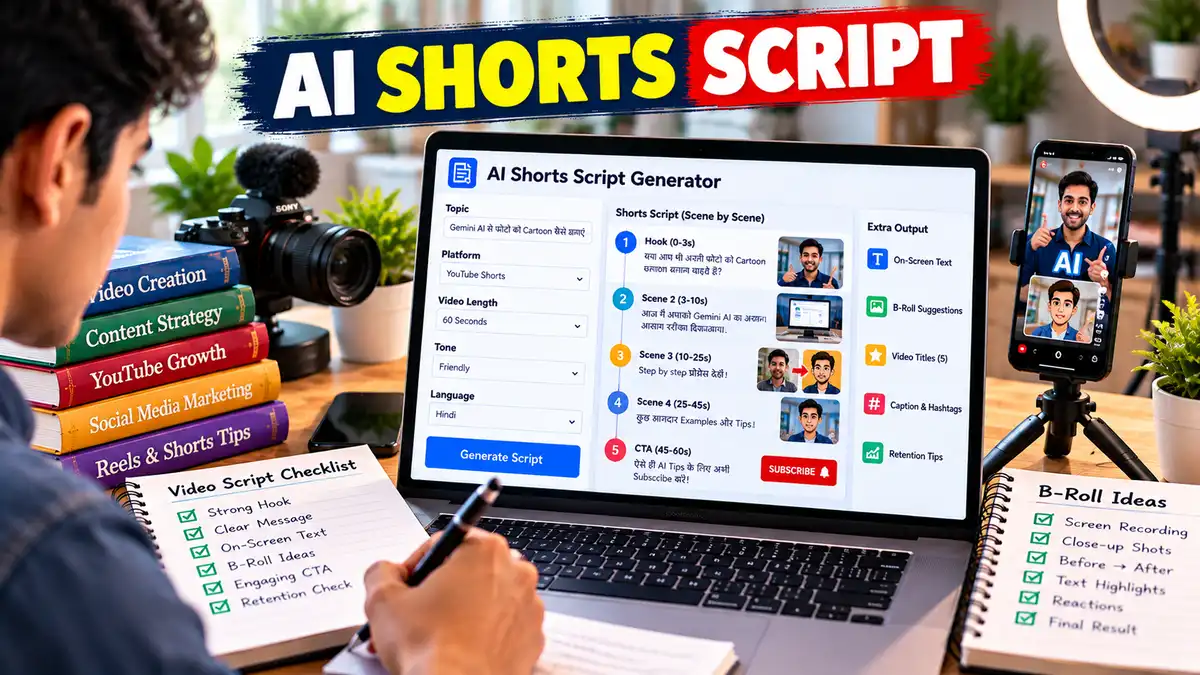
Shorts Script Prompt: AI से दमदार YouTube Shorts Script बनाएं
“Shorts Script Prompt से YouTube Shorts और Reels के लिए engaging short video scripts बनाएं। Strong Hook, fast pacing, On-Screen Text, B-Roll, CTA, alternative titles और retention check के साथ AI से ready-to-record script तैयार करें।”
Shorts Script Prompt से AI की मदद से YouTube Shorts और Reels की engaging script बनाएं। Hook, B-Roll, CTA, Titles और retention tips एक ही Prompt में पाएं।
Shorts की दुनिया में लंबी भूमिका का कोई खास फायदा नहीं होता। Viewer को पहले कुछ सेकंड में समझ आ जाना चाहिए कि वीडियो उसके लिए क्यों useful या interesting है। अगर शुरुआत धीमी हुई, तो अगला Short बस एक swipe दूर है।
इसीलिए Shorts Script Prompt में सिर्फ topic और duration बताना काफी नहीं है। एक अच्छी short-form script में strong Hook, fast information flow, simple narration, visual cues और natural CTA का सही balance होना चाहिए।
Shorts Script Prompt का उपयोग कैसे करें?
इस Prompt को इस्तेमाल करने का तरीका काफी आसान है। आपको बस अपने Short की basic information देनी है।
Step 1: Topic और Platform बताएं
पहले अपना Topic लिखें और बताएं कि वीडियो YouTube Shorts, Instagram Reels या Facebook Reels के लिए है।
अब बताएं कि वीडियो किसके लिए है। जैसे Students, Beginners, Creators या AI Users।
इससे AI उसी हिसाब से भाषा और examples चुनेगा।
Step 3: Duration डालें
अगर आपका Short 30 सेकंड का है तो [30 Seconds] लिखें। अगर 60 सेकंड का है तो [60 Seconds] चुनें।
यह जरूरी है क्योंकि बहुत ज्यादा information एक छोटे वीडियो में ठूंसने से Script rushed लग सकती है।
Step 4: Main Benefit बताएं
AI को साफ बताएं कि viewer वीडियो देखकर क्या सीख पाएगा।
उदाहरण:“Viewer 3 steps में फोटो को cartoon में बदलना सीखेगा।”
Step 5: Prompt AI में डालें
अब पूरा Prompt ChatGPT, Claude या किसी दूसरे AI में paste करें। AI आपको Hook से लेकर Ending तक पूरी Script के साथ On-Screen Text और B-Roll ideas भी देगा।
Step 6: Script को बोलकर Check करें
यह सबसे जरूरी tip है। Script को सिर्फ पढ़ें नहीं, जोर से बोलकर देखें। जहां सांस लेने में दिक्कत हो या line अजीब लगे, उसे छोटा करें।
Shorts में हर शब्द की कीमत होती है। इसलिए “आज हम आपको बताने वाले हैं…” जैसी लंबी शुरुआत की जगह सीधे viewer की problem पर जाना ज्यादा practical रहता है।
YouTube Shorts Script prompt – FAQs
Shorts Script Prompt क्या है?
Shorts Script Prompt एक detailed AI instruction है जिसकी मदद से YouTube Shorts या Reels के लिए short-form video script तैयार की जा सकती है। इसमें Hook, Main Script, On-Screen Text, B-Roll, CTA और Ending जैसे हिस्से शामिल होते हैं। इसका उद्देश्य कम समय में एक clear, natural और बोलने लायक script तैयार करना है।
YouTube Shorts Script कैसे लिखें?
YouTube Shorts Script लिखते समय शुरुआत के 1–3 सेकंड को सबसे ज्यादा महत्व दें। पहले Hook से viewer की curiosity जगाएं, फिर एक ही मुख्य idea को छोटे वाक्यों में समझाएं। जरूरत के अनुसार visual changes और On-Screen Text जोड़ें। अंत में छोटा CTA या engaging question रखें ताकि video का ending natural लगे।
AI से Shorts Script कैसे बनाएं?
AI से Shorts Script बनाने के लिए Topic, Audience, Platform, Duration और Tone बताएं। इसके बाद AI से strong Hook, spoken narration, visual suggestions और CTA के साथ script तैयार करने को कहें। अगर आप केवल “एक Short Script लिखो” कहते हैं, तो output generic हो सकता है; detailed instructions देने से result ज्यादा focused मिलता है।
ChatGPT से YouTube Shorts Script कैसे लिखें?
ChatGPT को पहले अपने Short का Topic और Target Audience बताएं। फिर Duration, Tone, Main Benefit और Important Points दें। इसके बाद एक structured Shorts Script Prompt इस्तेमाल करके Hook, Full Script, On-Screen Text और B-Roll मांगें। Script मिलने के बाद उसे अपने बोलने के तरीके के अनुसार edit करके record करना बेहतर रहता है।
YouTube Shorts Script कितने शब्दों की होनी चाहिए?
Shorts Script की लंबाई केवल शब्दों की संख्या से तय नहीं होती, क्योंकि हर व्यक्ति की बोलने की speed अलग होती है। बेहतर तरीका है कि Script को चुनी गई duration के अनुसार बोलकर test करें। 30, 45 और 60 सेकंड के Short में information की मात्रा अलग रखनी चाहिए ताकि narration बहुत तेज या अधूरी न लगे।
Shorts में पहले 3 सेकंड इतने जरूरी क्यों हैं?
Short-form video में viewer बहुत जल्दी अगले video पर जा सकता है। इसलिए शुरुआत में ऐसा Hook देना उपयोगी होता है जो तुरंत topic, problem, result या curiosity को सामने लाए। अगर शुरुआत में लंबा introduction या unnecessary greeting हो, तो viewer को आगे देखने का कारण कम मिल सकता है।
क्या AI से बनाई Shorts Script viral हो सकती है?
AI Script को viral होने की कोई guarantee नहीं है। AI बेहतर Hooks, content angles और structured scripts बनाने में मदद कर सकता है, लेकिन actual performance Topic, Audience Interest, Presentation, Editing, Timing और Viewer Response पर निर्भर करती है। इसलिए AI Script को अपनी personality और real experience के साथ edit करना ज्यादा अच्छा तरीका है।
📋 AI Prompt
आप एक Expert Short-Form Video Script Writer, Audience Retention Strategist और Social Media Content Creator हैं।मेरा लक्ष्य ऐसी Short Video Script तैयार करना है जो शुरुआत के कुछ सेकंड में viewer का ध्यान खींचे, एक clear और useful idea दे और पूरी video में fast लेकिन natural information flow बनाए रखे।मेरी वीडियो जानकारी:- Platform: [YouTube Shorts / Instagram Reels / Facebook Reels]
- Topic: [अपना वीडियो Topic लिखें]
- Main Keyword: [मुख्य Keyword लिखें]
- Target Audience: [जैसे Students / Beginners / Creators]
- Video Goal: [Inform / Educate / Entertain / Inspire / Promote]
- Video Duration: [30 / 45 / 60 Seconds]
- Language: [Hindi / Hinglish / English]
- Tone: [Friendly / Funny / Professional / Emotional / Energetic]
- Main Benefit: [Viewer को क्या सीखने या जानने को मिलेगा]
- Important Points: [वीडियो में शामिल किए जाने वाले Points]
- CTA: [Like / Comment / Follow / Subscribe / Share]
- Brand Style: [Simple / Premium / Bold / Casual]
- अगर कोई बात नहीं बताई गई है: [AI अपने best judgment का इस्तेमाल करे]अब मेरे लिए एक high-retention Short Video Script तैयार करें।स्क्रिप्ट लिखते समय इन नियमों का पालन करें:1. पहले 1–3 सेकंड के लिए एक powerful Hook लिखें।
2. Hook में curiosity, question, problem, surprising fact, result या strong promise का उपयोग करें।
3. Introduction को बहुत छोटा रखें। सीधे main point पर जाएं।
4. Script को spoken language में लिखें ताकि Creator इसे बिना अटके naturally बोल सके।
5. छोटे और आसान sentences का इस्तेमाल करें।
6. एक Short में एक मुख्य idea पर focus करें।
7. हर 5–10 सेकंड में information, example, visual या curiosity shift जोड़ें ताकि pacing बनी रहे।
8. अनावश्यक background information, greetings और filler lines से बचें।
9. जहां जरूरी हो वहां [On-Screen Text], [B-Roll], [Screen Recording], [Zoom], [Cut] और [Visual Change] जैसे production notes दें।
10. Important words या numbers को On-Screen Text के लिए अलग से mark करें।
11. Keyword को natural तरीके से इस्तेमाल करें। Keyword stuffing न करें।
12. कोई fake statistic, unsupported claim या misleading information न बनाएं।
13. अगर कोई factual information verify करनी जरूरी है तो [Fact Check Required] लिखें।
14. Clickbait ऐसा न हो जो video के actual content से मेल न खाए।
15. CTA छोटा और natural रखें। हर Short में लंबा “Like, Share, Subscribe” speech न दें।
16. Ending ऐसी रखें कि viewer को satisfying conclusion मिले।
17. जहां topic के लिए suitable हो, ending में Loop, Open Question या Curiosity Continuation का इस्तेमाल करें।
18. किसी दूसरे Creator की exact script, wording या style की नकल न करें।
19. Script की कुल लंबाई चुनी गई video duration के लिए practical spoken pace के अनुसार रखें।
20. अगर Topic बहुत broad है तो उसे Short के लिए एक specific angle में narrow करें।आउटपुट इस format में दें:### 1. Short Video Title
### 2. Hook – 1–3 Seconds
### 3. Full Script
### 4. On-Screen Text
### 5. B-Roll / Visual Suggestions
### 6. Editing & Pacing Notes
### 7. CTA
### 8. Ending / Loop Ideaइसके बाद:### 3 Alternative Hooks
- Curiosity Hook
- Problem Hook
- Result Hook### 3 Alternative Titles
- Search-focused
- Curiosity-focused
- Engagement-focused### Retention Check
- क्या Hook तुरंत attention पकड़ता है?
- क्या कोई unnecessary line है?
- क्या Script बोलने में natural है?
- क्या बीच में information drop तो नहीं है?
- क्या Ending satisfying है?
- क्या कोई Fact Check Required है?अंत में Script का अनुमानित बोलने का समय भी बताएं।
Act as an expert Short-Form Video Script Writer, Audience Retention Strategist, and Social Media Content Creator.My goal is to create a high-retention short-form video script that captures attention within the first few seconds, delivers one clear and useful idea, and maintains a fast but natural information flow throughout the video.Video Information:- Platform: [YouTube Shorts / Instagram Reels / Facebook Reels]
- Topic: [Enter your video topic]
- Primary Keyword: [Enter your main keyword]
- Target Audience: [Students / Beginners / Creators / etc.]
- Video Goal: [Inform / Educate / Entertain / Inspire / Promote]
- Video Duration: [30 / 45 / 60 Seconds]
- Language: [English / Hindi / Hinglish]
- Tone: [Friendly / Funny / Professional / Emotional / Energetic]
- Main Viewer Benefit: [What will the viewer learn or gain?]
- Important Points: [Points that must be included]
- CTA: [Like / Comment / Follow / Subscribe / Share]
- Brand Style: [Simple / Premium / Bold / Casual]
- If Information Is Missing: [Use your best judgment]Create a high-retention Short Video Script.Follow these rules:1. Create a powerful Hook for the first 1–3 seconds.
2. Use curiosity, a question, a problem, a surprising fact, a result, or a strong but truthful promise.
3. Keep the introduction extremely short and move directly into the main point.
4. Write for natural spoken delivery, not like a blog post.
5. Use short, easy-to-speak sentences.
6. Focus on one core idea per Short.
7. Introduce an information, example, visual, or curiosity shift approximately every 5–10 seconds where appropriate.
8. Remove unnecessary background information, greetings, filler, and repetition.
9. Add [On-Screen Text], [B-Roll], [Screen Recording], [Zoom], [Cut], and [Visual Change] notes where useful.
10. Clearly identify important words, numbers, or phrases that should appear as On-Screen Text.
11. Use keywords naturally and avoid keyword stuffing.
12. Never invent statistics, unsupported claims, or misleading information.
13. If a factual claim requires verification, mark it as [Fact Check Required].
14. Avoid clickbait that does not match the actual video.
15. Keep the CTA short and natural. Avoid long “Like, Share, Subscribe” speeches.
16. End with a satisfying conclusion.
17. When appropriate for the topic, use a Loop, Open Question, or Curiosity Continuation at the end.
18. Do not imitate another creator's exact script, wording, or style.
19. Keep the script length appropriate for the selected duration and realistic spoken delivery speed.
20. If the topic is too broad, narrow it into one specific angle suitable for a Short.Output Format:### 1. Short Video Title
### 2. Hook – First 1–3 Seconds
### 3. Full Script
### 4. On-Screen Text
### 5. B-Roll / Visual Suggestions
### 6. Editing & Pacing Notes
### 7. CTA
### 8. Ending / Loop IdeaThen provide:### 3 Alternative Hooks
- Curiosity Hook
- Problem Hook
- Result Hook### 3 Alternative Titles
- Search-focused
- Curiosity-focused
- Engagement-focused### Retention Check
- Does the Hook capture attention immediately?
- Is there any unnecessary line?
- Does the script sound natural when spoken?
- Is there any information drop in the middle?
- Is the ending satisfying?
- Is any fact marked for verification?Finally, estimate the spoken duration of the script.
📤 AI Output Example
मान लीजिए Input है:Topic: Gemini AI से Photo को Cartoon बनाएं
Platform: YouTube Shorts
Audience: Beginners
Duration: 45 Seconds
Tone: Friendly + Energetic
AI का संभावित Output:Short Video Title
Gemini AI से Photo को Cartoon बनाएं!Hook – First 1–3 Seconds
“आपकी Normal Photo सिर्फ एक Prompt से Cartoon बन सकती है!”Full Script
“बस अपनी Photo Gemini AI में Upload करें और उसे बताएं कि आप किस तरह का Cartoon चाहते हैं।[B-Roll: Smartphone पर Photo Upload]
अब एक simple prompt लिखें—
‘इस Photo को high-quality 3D cartoon style में बदलो, चेहरे की पहचान और main features को natural रखो।’[On-Screen Text: Upload → Prompt → Generate]
अब Generate पर tap करें।[B-Roll: AI Result दिखाई दे]
कुछ ही समय में आपकी Photo का Cartoon Version तैयार हो सकता है।
लेकिन एक बात ध्यान रखें—अगर आपको बेहतर result चाहिए, तो सिर्फ ‘cartoon बना दो’ मत लिखिए। Style, Background, Lighting और Expression भी बताएं।[Zoom: Before vs After]
और अगर पहली image पसंद नहीं आती, तो Prompt में बदलाव करके दूसरा version generate करें।CTA
“ऐसे और आसान AI tricks चाहिए तो Follow जरूर करें।”
Ending / Loop Idea
“और अगली बार अपनी Photo को किस style में बदलना है?”On-Screen Text
PHOTO → CARTOON
Upload Photo
Add Prompt
Generate
Try Again
B-Roll
Smartphone screen recording
Photo upload
Prompt typing
Generated result
Before/After comparisonAlternative Hooks
Curiosity: “क्या AI आपकी Photo को Cartoon में बदल सकता है? खुद देखिए।”
Problem: “Photo को Cartoon बनाने के लिए अब अलग App की जरूरत नहीं।”
Result: “एक Photo और एक सही Prompt—बस इतना ही!”Retention Check
Hook तुरंत result बताता है।
Script एक ही clear process पर focused है।
Visual changes हर कुछ seconds में हो सकते हैं।CTA छोटा है।
Ending में viewer interaction का सवाल है।
यह लगभग 40–45 सेकंड की natural speaking pace के लिए उपयुक्त हो सकता है।
✍️ लेखक के बारे में
Prabhuwan Mishra
मैं Prabhuwan Mishra AIHelpHindi.com का Founder और Content Creator हूं। मैं AI Tools, Prompt Engineering, Online Earning, Digital Skills और Automation के क्षेत्र में गहरी रुचि रखता हूं।
AIHelpHindi के माध्यम से मैं सरल हिंदी भाषा में प्रैक्टिकल गाइड्स, AI Apps की जानकारी, Prompt Tutorials और Online Income Strategies साझा करता हूं, जिससे कि भारत के छात्र, फ्रीलांसर और डिजिटल क्रिएटर्स नई तकनीक का सही उपयोग करके आगे बढ़ सकें।
मेरा उद्देश्य है कि AI और Digital Skills की सही जानकारी हिंदी में उपलब्ध हो, जिससे हर व्यक्ति टेक्नोलॉजी का लाभ उठा सके। मैं विशेष रूप से AI Tools Reviews, Freelancing Guides, Blogging with AI और Passive Income Methods पर नई- नई जानकारी लिखता हूं।